


How to Know If Your Workflow Is Ready for an AI Agent
Companies with documented processes use AI tools 40% faster than those without clear workflow maps. This is from the World Economic Forum’s 2025 Digital Transformation Report. Most engineering teams skip the assessment phase entirely.
I’ve watched this pattern repeat across dozens of implementations. Teams decide they want autonomous agents, pick a workflow that feels automation-ready, and start building. Three months later they discover the workflow wasn’t actually ready. The outcome metrics were undefined. The data lived in people’s heads. Error tolerance was zero. They built a proof-of-concept that can never ship to production.
Here’s what makes this frustrating: systematic readiness assessment would have flagged these issues in the first week. Organizations with AI readiness scores above 70% are three times more likely to adopt AI. The Deloitte 2025 AI Readiness Index found this. They can do so successfully within 12 months. Proper assessment isn’t planning overhead. It’s the difference between shipping in weeks versus staying stuck in pilot purgatory.
The urgency is real. KPMG’s Q1 2025 AI Pulse Survey shows 65% of organizations moved from early tests to full pilot programs. This is up from 37% last quarter. Most of those pilots will fail not because the AI doesn’t work, but because teams chose workflows that weren’t ready.
I’m writing to share the documented assessment criteria that separate ready workflows from those needing more preparation. This framework has saved portfolio companies months of wasted engineering effort by identifying blockers before code gets written.
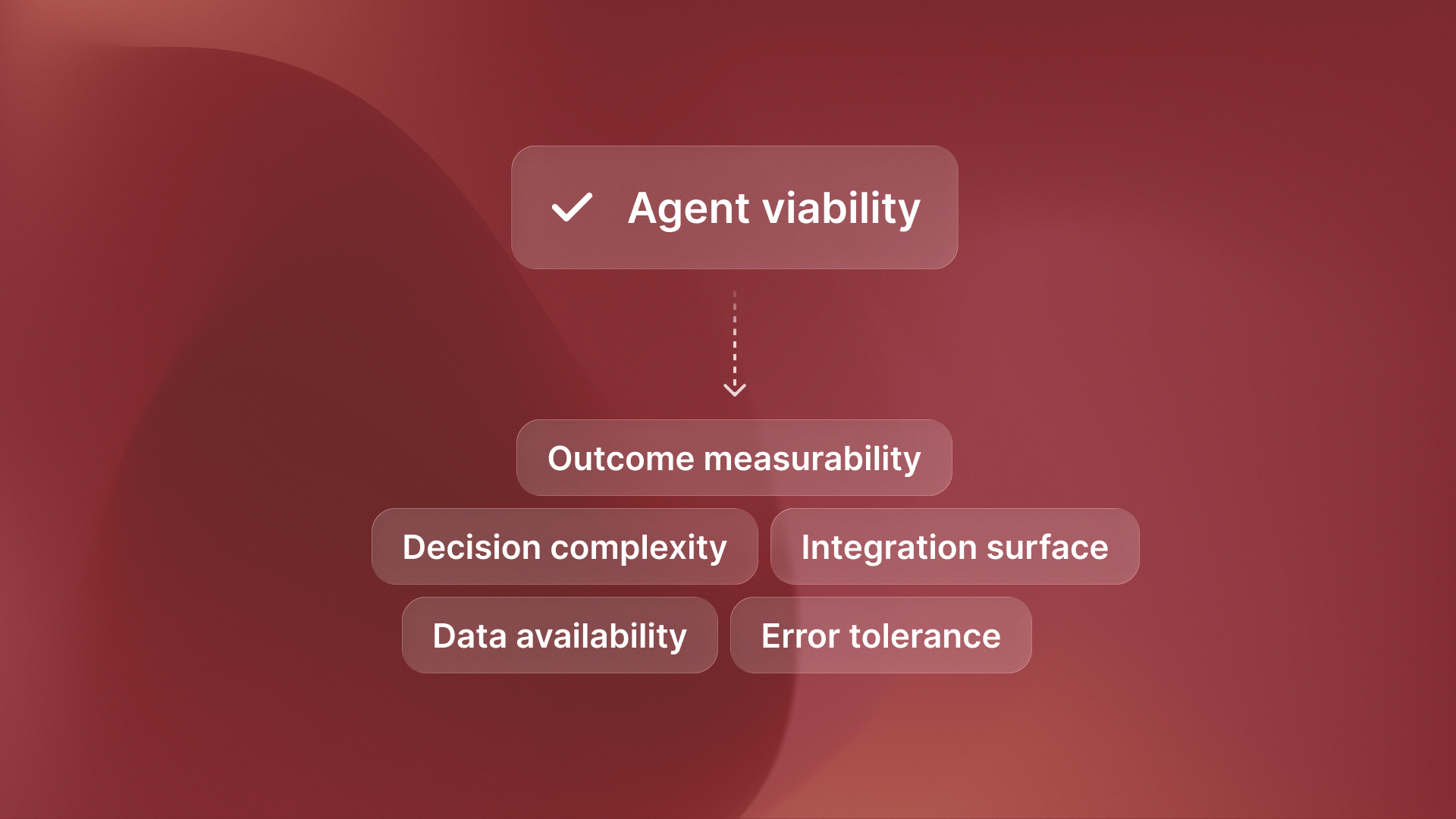
The Five Readiness Criteria That Determine Agent Viability
Every workflow can be scored on five criteria. Rate each 1-5. Workflows scoring 18+ out of 25 are ready for autonomous agents today. Below that threshold, you’re building something that won’t ship.
Outcome Measurability: Can you define success with specific metrics that an agent can optimize? If the goal is “better customer experience,” it’s not ready. If it’s “resolve 85% of tickets in under 2 hours,” it is. Agents need targets they can measure and improve against. Vague quality goals don’t work.
Data Availability: Does structured, accessible data exist that captures the workflow’s current state and history? Agents need training data and runtime context. If critical information lives in people’s heads or unstructured Slack messages, readiness is low. You can’t automate what you can’t quantify.
Error Tolerance: What happens when the agent makes a mistake? Can errors be caught and corrected without catastrophic consequences? High error tolerance equals high readiness. Zero error tolerance means build assistants that support humans, not agents that replace them.
Decision Complexity: How many variables and edge cases exist? Can rules be documented even if they’re complex? Here’s the counterintuitive part: complex but documented processes score higher than simple but intuitive ones. You can encode documented complexity. You can’t encode human intuition.
Integration Surface: How many systems need to connect? Are APIs available or do you need to build them? More integrations mean more effort, but don’t automatically disqualify readiness if other criteria are met. It’s about engineering effort, not feasibility.
The Assessment Framework: Scoring Your Workflows
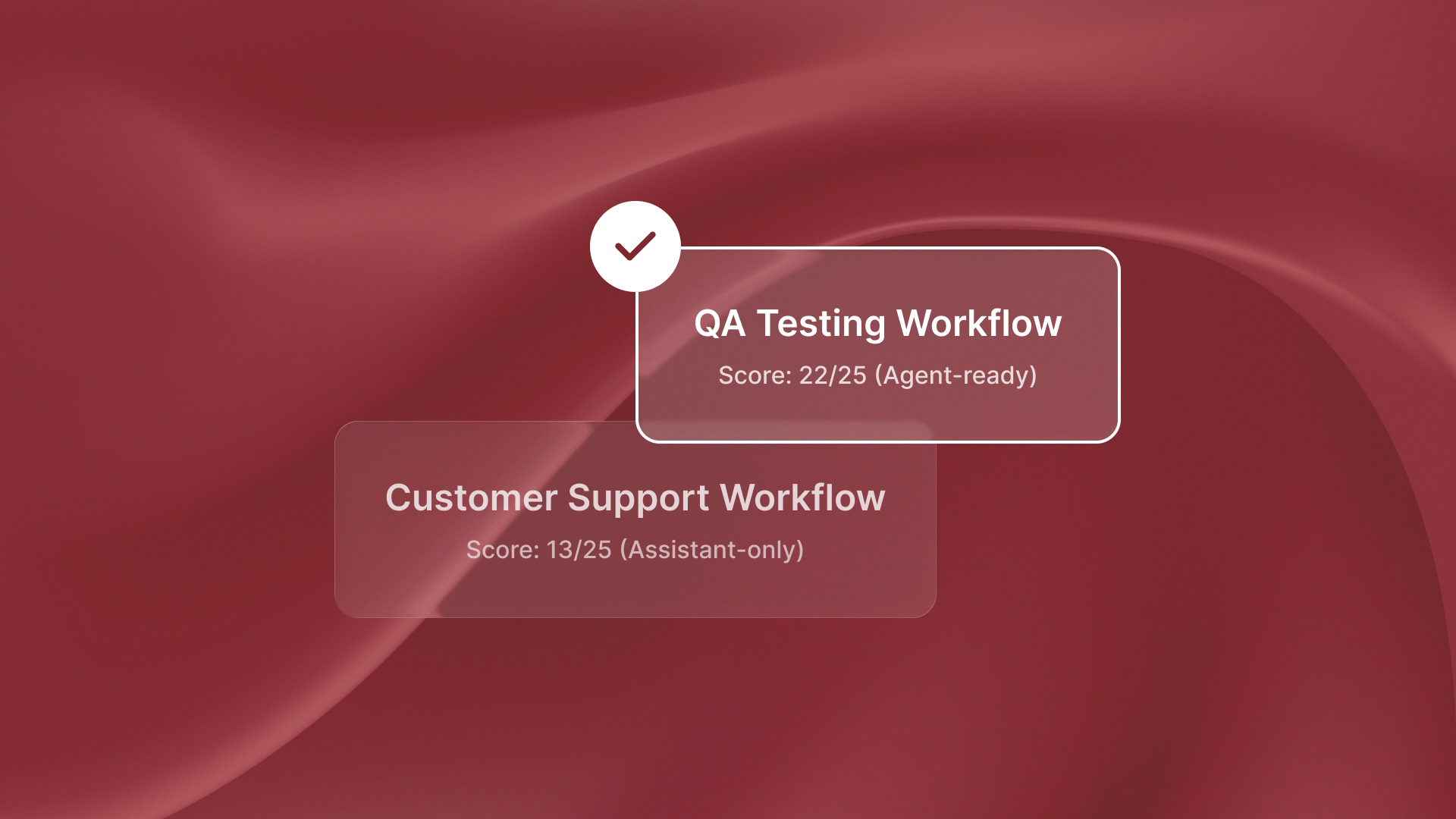
Last week I was talking to a team evaluating their QA testing workflow for automation. We scored it together. Outcome measurability: 5 (bugs found, test coverage percentage, regression detection rate). Data availability: 5 (structured test results, bug reports, code changes). Error tolerance: 4 (false positives are annoying but not catastrophic). Decision complexity: 4 (test generation rules can be documented). Integration surface: 4 (connects to GitHub, Jira, CI/CD pipeline). Total: 22 out of 25.
That’s why autonomous testing agents like QA flow work reliably in production. The workflow scores above the 18-point threshold that indicates agent readiness.
Contrast that with a customer support workflow the same team wanted to automate. Outcome measurability: 2 (what makes a resolution “good” is subjective). Data availability: 3 (some tickets are structured, but context is scattered). Error tolerance: 2 (wrong answers damage customer relationships). Decision complexity: 2 (involves human judgment that’s hard to document). Integration surface: 4 (Zendesk, Slack, knowledge base). Total: 13 out of 25.
That workflow isn’t ready for autonomous agents. It might be ready for assistants that draft responses for human approval. The scoring revealed this in 30 minutes, before any engineering resources were committed.
Common scoring mistakes: Teams overrate outcome measurability by confusing activity metrics with outcome metrics. “Number of tickets closed” is an activity metric. “Customer satisfaction with resolution” is an outcome metric, but it’s often poorly defined. Teams also underrate error tolerance. They assume agents must be perfect, even when 90% accuracy is fine. This works if errors are easy to catch.
The 70% threshold from Deloitte’s research translates to 18 out of 25 on this framework. Not perfect, but ready enough to start building with confidence.
Red Flags That Kill Agent Projects (Even When Scores Look Good)
Some workflows score well on paper but fail in implementation. Here’s what to watch for:
Undefined success metrics: If stakeholders can’t agree on what “done” looks like, don’t start building. I watched a team spend two months building a compliance monitoring agent. Then they learned legal and operations defined “compliant” in different ways The agent optimized for the wrong target.
Phantom data: Teams assume data exists because “we track everything.” Then during implementation they discover that critical context lives in unstructured documents or tribal knowledge. Before scoring data availability high, actually pull the data. Verify it’s structured and accessible.
Zero error tolerance can look like a quality standard. If one mistake causes regulatory violations, customer churn, or financial loss, it is not an agent workflow. No matter how well-documented the process is. Build assistants that augment humans instead. Some processes require human judgment in the loop by design.
Integration quicksand: Some workflows require connections to 15+ legacy systems with APIs that don’t exist. Even if other criteria score high, the engineering effort might not justify the automation value. Be honest about integration reality before committing resources.
Process instability: If the workflow changes monthly, agent development can’t keep pace. Wait for process stabilization or build flexible assistants that adapt more easily. Autonomous agents work best when processes are stable enough to encode.
From Assessment to Implementation: What Happens After Scoring
For high-scoring workflows (18+), move directly to architecture design. You’ve validated readiness. Now focus on infrastructure planning and deployment timelines. The Islands blog on agents vs assistants explains key architecture choices. These choices can lead to 4x ROI or smaller productivity gains.
For medium-scoring workflows (12-17), identify which specific criteria are dragging scores down. Can you improve outcome measurability by defining better metrics? Can you increase error tolerance by adding review checkpoints? Sometimes two weeks of preparation work moves a workflow from medium to high readiness.
For low-scoring workflows (below 12), don’t force AI implementation. Either invest in substantial groundwork (process documentation, data infrastructure, integration development) or deprioritize this workflow entirely. Low scores aren’t failures. They’re valuable prioritization signals that prevent expensive mistakes.
Most organizations have 5-10 workflows they want to automate. Use assessment scores to stack-rank them. Start with the highest-scoring workflow, ship it to production, learn from deployment, then tackle the next one. Sequential deployment beats parallel pilots that never ship.
Real Assessment Examples: What Ready Actually Looks Like
Here’s what I noticed working with ReachSocial on LinkedIn engagement automation. Outcome measurability: 5 (engagement rate, response time, connection acceptance rate). Data availability: 5 (LinkedIn interaction history, message templates, targeting criteria). Error tolerance: 4 (engagement mistakes are recoverable, worst case is unfollowing). Decision complexity: 4 (engagement patterns can be documented and optimized). Integration surface: 3 (LinkedIn API limitations require workarounds). Total: 21 out of 25.
That’s agent-ready despite complexity. The workflow scored above 18 because it met the core criteria: measurable outcomes, available data, acceptable error tolerance, and documentable decision logic.
Contrast that with a financial forecasting workflow a portfolio company evaluated. Outcome measurability: 2 (forecast accuracy depends on external market factors). Data availability: 4 (historical data exists). Error tolerance: 1 (bad forecasts drive bad business decisions). Decision complexity: 3 (models can be built but require constant tuning). Integration surface: 3 (connects to accounting systems). Total: 13 out of 25.
The scoring breakdown revealed that low error tolerance and poor outcome measurability made this unsuitable for autonomous agents. They built a forecasting assistant instead, where humans review and adjust predictions before acting on them.
Something interesting happened at Timecapsule when they evaluated their time tracking categorization workflow. Initial score: 11 out of 25 (low outcome measurability, medium data availability, low error tolerance). After two weeks of prep work, the score jumped to 19. We set clear category rules. We improved the data structure. We added review checkpoints to catch errors. The workflow became agent-ready through targeted improvements to specific criteria.
The Assessment Prevents Expensive Mistakes
Readiness assessment feels like planning overhead when you want to start building immediately. But that 40% faster implementation from World Economic Forum data comes from avoiding false starts, not from moving slowly.
The framework’s value is in what it tells you NOT to build as much as what it greenlights. If you can’t score a workflow above 18 out of 25, don’t start building an autonomous agent for it yet. Build assistants, improve readiness, or pick a different workflow.
Most teams waste 3-6 months building proofs-of-concept for workflows that fail these readiness criteria. The assessment framework flags those issues in the first week, before significant engineering investment.
Next week I’ll dig into what happens after you identify a ready workflow. I’ll cover the architecture choices that decide the outcome. You may get full workflow replacement or only small productivity gains. The readiness score tells you what to build. The architecture determines what value you’ll capture.